Category

home » life · music · movies · tech · guides · games · releases · etc
Showing posts with label guides. Show all posts

Wednesday, August 13, 2008

[how-to] download mp3's with torrents

This will be a multi-post how-to. I wouldn't want to overload this page ending up with an extremely long (yawn) article.

Related Articles:
How to download mp3's with Google
How to download mp3's with Firefox Plug-in

By now, you may have had several ways of getting mp3’s… so these are for those that don’t know still or those that forgot. hehe

Legal Disclaimer: (Let’s get this out of the way first) By reading on, you expressly agree that,

  • This article is strictly for educational purposes only.
  • The methods outlined here are most likely known and have multiple articles posted on a gazillion pages.
  • Piracy is illegal in most countries so you won’t do it.
  • Buy only original music CD’s or from authorized web vendors.
  • You will only read this article and not do the steps outlined.

μTorrent

I've tried a couple of torrent clients. BitTorrent (Official), BitLord, Azureus (now goes by the name Vuse), BitComet, etc.

If you want absolute control, lots of extra features and fine-tuning, use Azureus. But if you want a lightweight solution, use μTorrent instead.

I like μTorrent, it's portable, fast and it works.

Again, since this is not a software review, I will not delve into details of installation, use and optimization of your torrent client. That would be a separate article which I will try to write soon. :)

After you get your client running, test it first. Download OpenOffice, Fedora, Ubuntu or any other popular open source download. When choosing, just make sure you are getting the latest stable version, this way you'd have more seeds and peers. Also, for those new to the torrent world, we are looking for files having the .torrent extension.

Ok, now on to looking for music files.

As much as possible, I try to get the best seeded, highest bitrate full albums. This allows me to find hidden album gems ie. unreleased songs or songs that didn't make it to mainstream radio. If you just want a specific track, you have the option of downloading just that (provided that the album is not zipped/rared etc.).

You can Google for this easy...

Sample search string.

Code:

Warning: Most torrent sites are plagued with porn ads. So watch where you click and use common sense. Never sign up, there's no need to.

Here are some of the more popular public trackers.
ThePirateBay
Mininova
TorrentBox

There are a lot more but I usually get what I'm looking for with just ThePirateBay.

Always read the comments before downloading. If most people are saying that the torrent is crap, has a trojan, or fake... then most likely it is. Also when choosing which torrent to download, get the best seeder-to-leecher ratio. I will discuss this on upcoming articles.

Same with the How to download mp3's with Google article, this can be used to get anything... software, games, movies, TV series, name it!

Read more...

Tuesday, August 12, 2008

[how-to] download mp3’s with firefox plug-in

This will be a multi-post how-to. I wouldn't want to overload this page ending up with an extremely long (yawn) article.

Related Articles:
How to download mp3's with Google
How to download mp3's with Torrents

By now, you may have had several ways of getting mp3’s… so these are for those that don’t know still or those that forgot. hehe

Legal Disclaimer: (Let’s get this out of the way first)
By reading on, you expressly agree that,

  • This article is strictly for educational purposes only.
  • The methods outlined here are most likely known and have multiple articles posted on a gazillion pages.
  • Piracy is illegal in most countries so you won’t do it.
  • Buy only original music CD’s or from authorized web vendors.
  • You will only read this article and not do the steps outlined.


Firefox

If you’re still using Internet Explorer (any variant) stop here. Do yourself a huge favor and download Firefox. Latest version is 3 but since this was released recently, there are still some kinks but no need to worry as updates are automatically installed. Enough of the advertisement as this is not a software review. Hehe.

You can download version 3 or version 2, your choice.
download firefox 3 here
download firefox 2 here

Plug-in

This is what makes Firefox awesome. But again, as downloading mp3’s is the main topic here, the only plug-in you would need is DownloadHelper. There are other similar plug-ins but this is the most used and I have not needed to try others.

Now, if you are new to Firefox and you have a freshly installed copy, you can get the plug-in several ways.

Open Firefox and,

install DownloadHelper 3.2

or

Search for it at Mozilla’s plug-in download page.

Install, and agree to restart browser when asked.

Once your browser restarts, you will now have a new icon on your toolbar inactive downloadhelper icon. When downloadable media is detected, the icon will become colored and animated like so active downloadhelper icon. When this happens (and when you of course want to download what’s on the page you are on), hit the dropdown arrow and you will be presented with what you can download
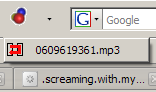
downloadhelper dropdown.

That’s it, we’re all set… now on to the good stuff!

With the outburst of affordable high-speed internet, a lot of people (me included) now have the bandwidth for rich streaming media content. This is where we will get our mp3’s from.

My site of choice? Jango.

Step 1: Google for your song. Below is a sample search string.
Code:

And here’s a sample link that you might end up with
Code:


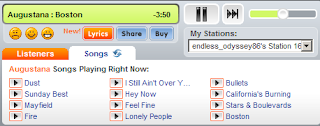
Step 2: Once on the Jango page, sometimes it will automatically play a different song, if this is the case, look at the song list and select your song, if it’s not there, click the “songs” tab to refresh the list. Just make sure the song you want to download is currently playing.
jango player
Note: No need to sign up. If the nag screen shows up, just close it.

Step 3: Look at your DownloadHelper icon, if it’s moving you can click on the dropdown to view the mp3 ready for download and click the file to start the download.
downloadhelper dropdown
Note: Never mind the obscure filename; just rename it to your liking.

There are a lot of other sites from where you can download from. I like Jango because so far I keep getting decent quality mp3’s from them (most having proper tags already). Hehe.

[Update] Completly forgot about Last.FM, there are some full tracks there but mostly all you get are 25 sec. music clips. But there is a workaround (assuming we have the same taste in music, no search capabilities here).

See the Last.FM Radio on the right column,
Last.FM Radio

Hit play and it will stream for you tracks from my library. These are tracks that I played which are available from their mp3 catalog. So these are not actually my mp3's.

Note: Sometimes, the download window opens but gets stuck at 'starting', if this happens with Jango, just refresh the page. Or just let it finish playing (for Last.FM radio).
Read more...

Monday, August 11, 2008

[how-to] download mp3's with google

This will be a multi-post how-to. I wouldn't want to overload this page ending up with an extremely long (yawn) article.

Related Articles:
How to download mp3's with Firefox Plug-in
How to download mp3's with Torrents

By now, you may have had several ways of getting mp3’s… so these arefor those that don’t know still or those that forgot. hehe

Legal Disclaimer: (Let’s get this out of the way first)
By reading on, you expressly agree that,

  • This article is strictly for educational purposes only.
  • The methods outlined here are most likely known and have multiple articles posted on a gazillion pages.
  • Piracy is illegal in most countries so you won’t do it.
  • Buy only original music CD’s or from authorized web vendors.
  • You will only read this article and not do the steps outlined.


Google

This was reliable a few years back, when loads of people stored everything on public FTP's but now it's getting more and more difficult to download 'stuff' with this method. Still works sometimes though...

See the Google search bar i have on the upper right side?

Go there and type the name of the artist, title of the song or album and paste this at the end.

Code:


Tip: You can make use of grouping operators for a tight resultset.

Code:


If it's too restrictive, just try with the artist name and/or song title.

Search box on top page too far of a movement for your wrist?
Here, just add in the song title, artist name, album, etc... and hit search.


Tip: This is more of a general use article. You can search for virtually any file type by simply modifying the "mp3" part of the query string to your file extension of choice ("pdf","doc","wma", etc.)

Once you get your search results, it should look something like this
Google Search Result

Search through the results, we want the FTP directories which looks like this
FTP Site Sample

Click and download.

Note: You will sometimes get results which look like FTP directories, but after clicking on the file, will redirect you to a website. Just go back and try a different one.
Read more...